• Skip to main content
  • Skip to primary sidebar
Making Different

Making Different

Create, Learn, Build or Fix

  • Tech
  • Business
  • Relationship
  • Health
  • Travel
You are here: Home / Technology / Internet, Networking, & Security / How to check if a website is up or down

How to check if a website is up or down

October 7, 2013 by Nitin Maheta

Sometime, you might noticed that many sites not opening in your browser, mostly it happens on social networking sites likes Facebook, twitter, etc. So, you will be confused about site which you trying to open but not opening for everyone or just for you. in this situation, all you need to do to check to find out that site is down for you or everyone. There is many online websites available to check a website is down for you or everyone. follow the simple steps given below.

First thing you need to do is go to isup.me and enter site URL which not opening in your browser, and hit enter or click on “or just me?”. site will load and tell you that site is up or down. for more details check the screenshot below.
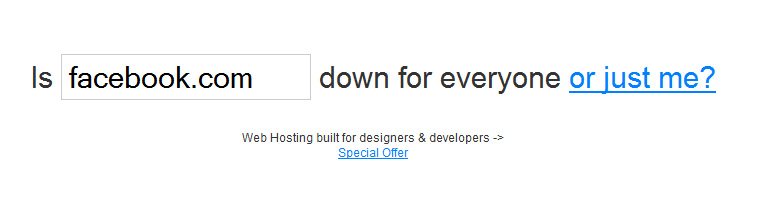
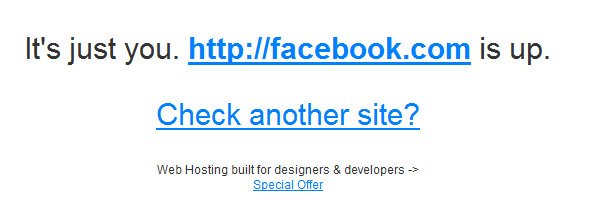
1

2

Isn’t easy?

There is many other good websites available to check. but this is quick and easy website to check it. but you should be knowledgeable with other good websites too. Here is some more websites to check a site is down or up.

1. http://www.isitdownrightnow.com/
2. http://downrightnow.com/
3. http://downorisitjustme.com/
4. http://aretheyup.com/
5. http://isitdown.us/
6. http://www.websitedown.info/

Hope this article help you to check a website is up or down. I know there is also many websites are available and I am missing to add in this list, if you know about any website which provides this service then feel free to share in comments.


About Nitin Maheta

Nitin Maheta is editor in chief and webmaster of MakingDifferent Blog. You may reach him out on following social media:

Facebook | Twitter | Instagram

Primary Sidebar

Similar Posts

  • 8 Best Internet Archive Wayback Machine Alternatives
  • How to Download Scribd Documents for Free
  • How to Find Someone’s Phone Number Online?
  • 192.168.1.1 Login Page, Username, Password and Wireless Settings
  • How to Find the Right US Proxy Server
  • Linksys Router Admin IP Address 192.168.1.1
  • How do I find the 192.168.1.1 password
  • Verifying the Information You Find Online
  • 100 Best Funny and Cool Wi-Fi Names for Your Router!
  • 5 Steps in Defending Business Against Cyberattacks
  • NSFW Meaning: What It Stands For & How to Use It (With Examples)

Random Posts

top-10-free-youtube-intro-makers

Top 10 Free Online YouTube Intro Makers

By Nitin Maheta

Head-Cake-Halloween-Food-Recipes

Tasty and Grossy, yet Scary Halloween Foods

By Nitin Maheta

what-is-snooze-in-gmail

What Is Snooze in Gmail and How to Turn It On or Off

By Tejas Maheta

Section-Symbol

What is the meaning of the “§” symbol (Section Symbol)?

By Nitin Maheta

ASUS ZenFone 3 Review- An All-Rounder Multitasking smartphone

By Nitin Maheta

All categories | About us | Contact us | Privacy policy | Disclaimer | Write for Us | Dictionary | Sitemap

The owner of this site is a participant in the Amazon Services LLC Associates Program, an affiliate advertising program designed to provide a means for sites to earn advertising fees by advertising and linking to amazon.com.

© 2026 Making Different